目录展开

笔者最近在完成抖音关注页面的仿写过程中了解到可以使用 SDWebImage 来进行头像加载的优化,当时只来得及了解其简单使用。现在有时间了,准备了解一下他的内部源码实现。
一、简介
SDWebImage 是 iOS 中提供图片加载的第三方库,可以给 UIKit 框架中的控件比如UIImageView和UIButton提供从网络上下载和缓存的图片。它的接口十分简洁,如果给UIImageView 控件添加图片可以使用如下代码:
[imageView sd_setImageWithURL:imageUrl placeholderImage:nil];//第一个参数是图片的URL第二个参数是占位图片加载失败时显示如果给 UIButton 添加图片可以使用以下代码:
[button sd_setImageWithURL:imageUrl forState:UIControlStateNormal placeholderImage:nil];//第一个参数是图片的URL,第二个参数是按钮状态,第三个参数是占位图片,加载失败时显示SDWebImage 还提供了其他方法, 但是我们通过查看源码发现,最终都是调用气全能方法,全能方法还提供了占位图、可选项、加载进度和完成回调。
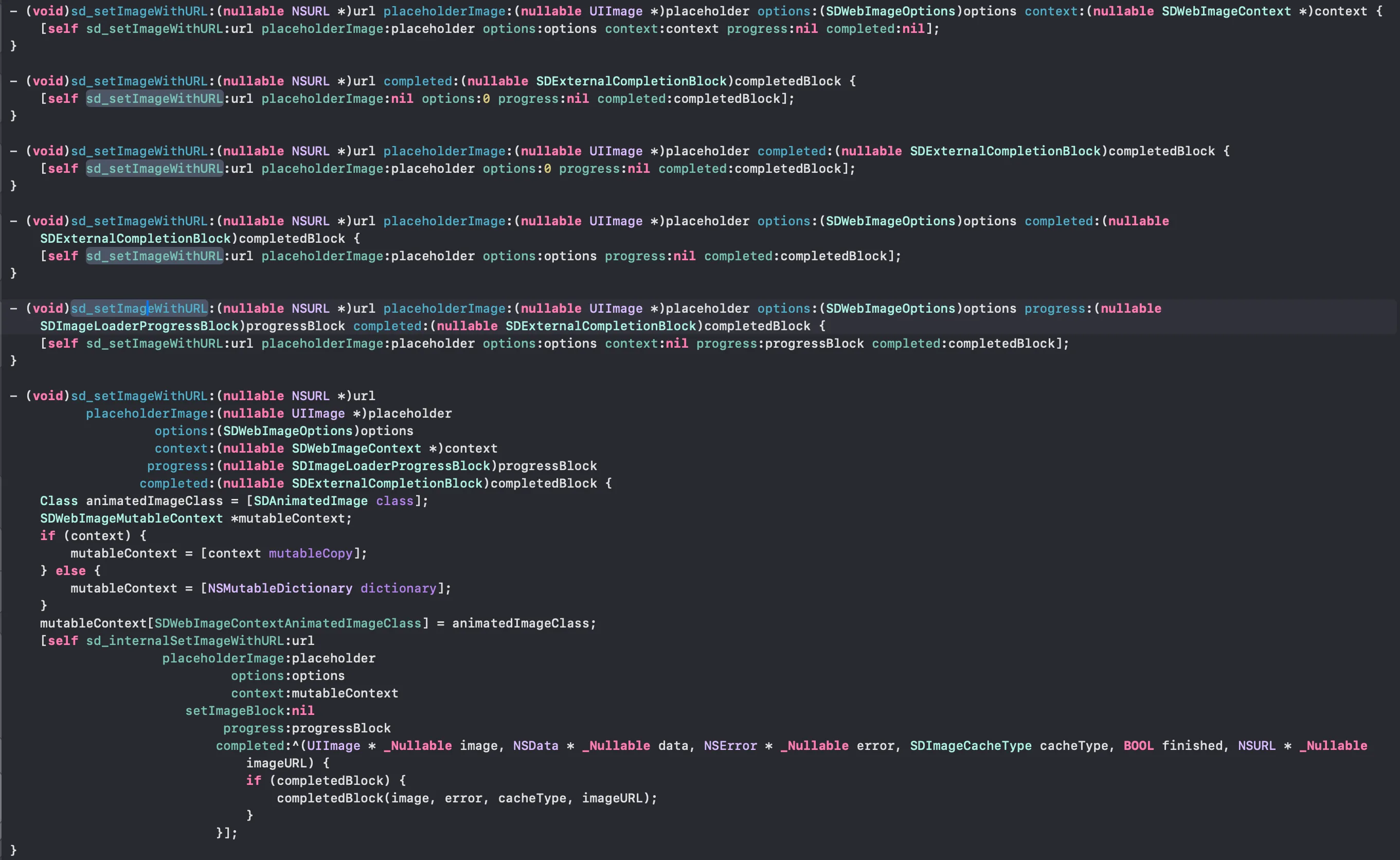
- 占位图像: 在网络图片加载过程中,ImageView 会显示占位图像,给用户一个视觉上的暂时反馈。当网络图片加载完成后,ImageView 中会显示加载完成的图片。
- 选项: 是一个枚举类型的值,用于设置加载图片的选项。其中包含了一些常用的选项,例如缓存策略、图片解码方式、加载优先级等。通过传递不同的选项,可以对图片加载的行为进行定制。
- 进度: 它们提供了对图片加载过程中的进度和结果的反馈。它们提供了对图片加载过程中的进度和结果的反馈。
- 完成回调: 是一个块对象,用于在图片加载完成后执行相应的操作。
SDWebImage 有下面一些常见的功能:
- 通过异步方式加载图片
- 可以自动缓存到内存和磁盘中,并且可以自动清理过期的缓存
- 支持多种的图片格式包括 jpg、jepg、png 等,同时还支持多种动图格式包括 GIF、APNG 等
- 同一图片的 URL 不会重复下载
- 对失效的图片 URL 不会重复尝试下载
- 在子线程中进行操作,确保不会阻塞主线程
二、SDWebImage 调用流程
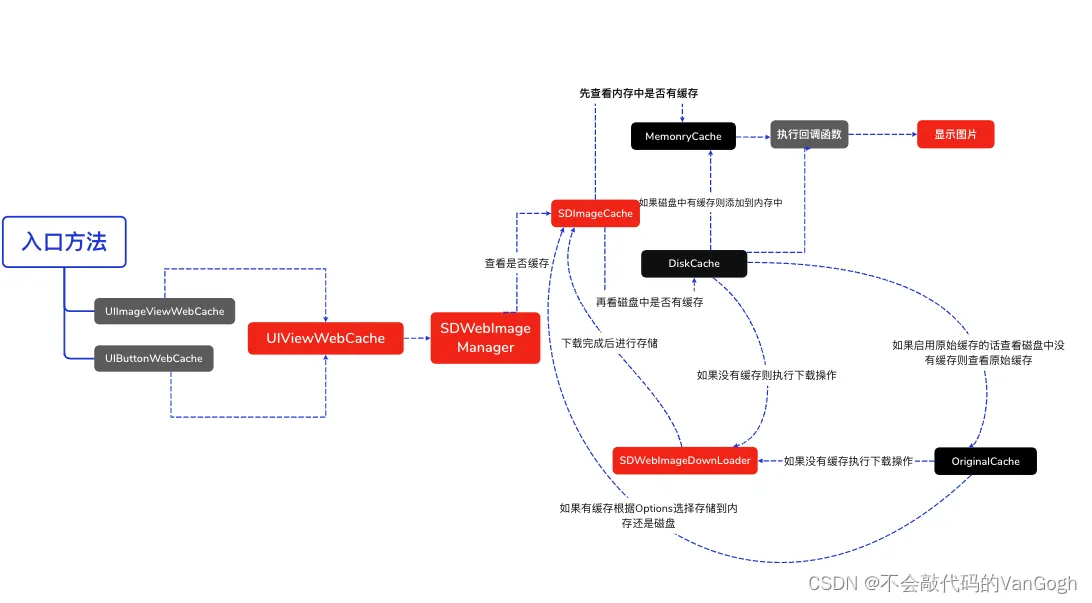
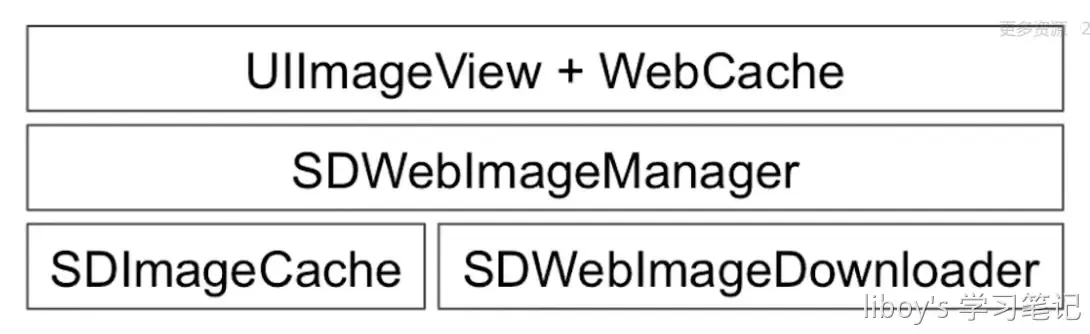
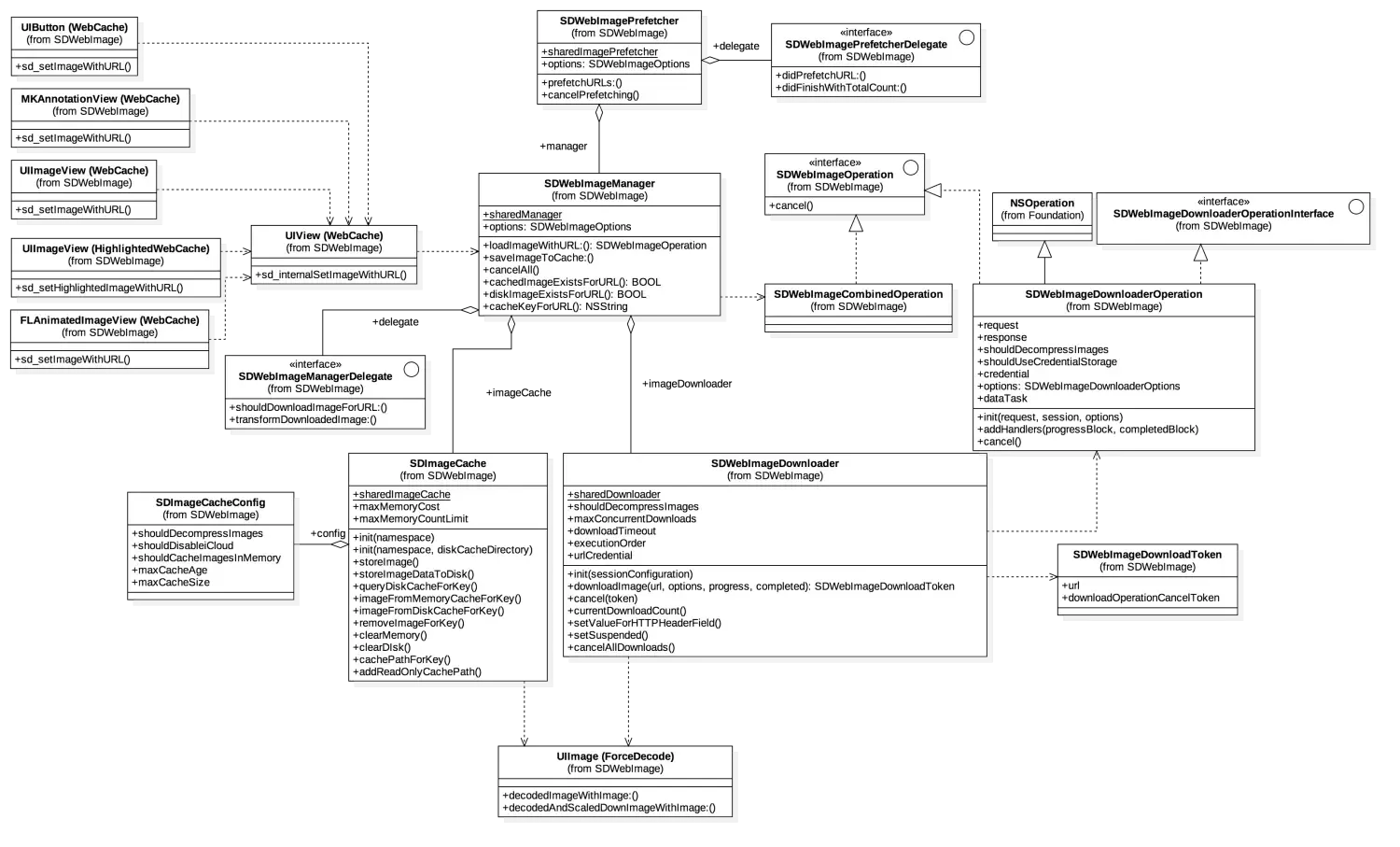
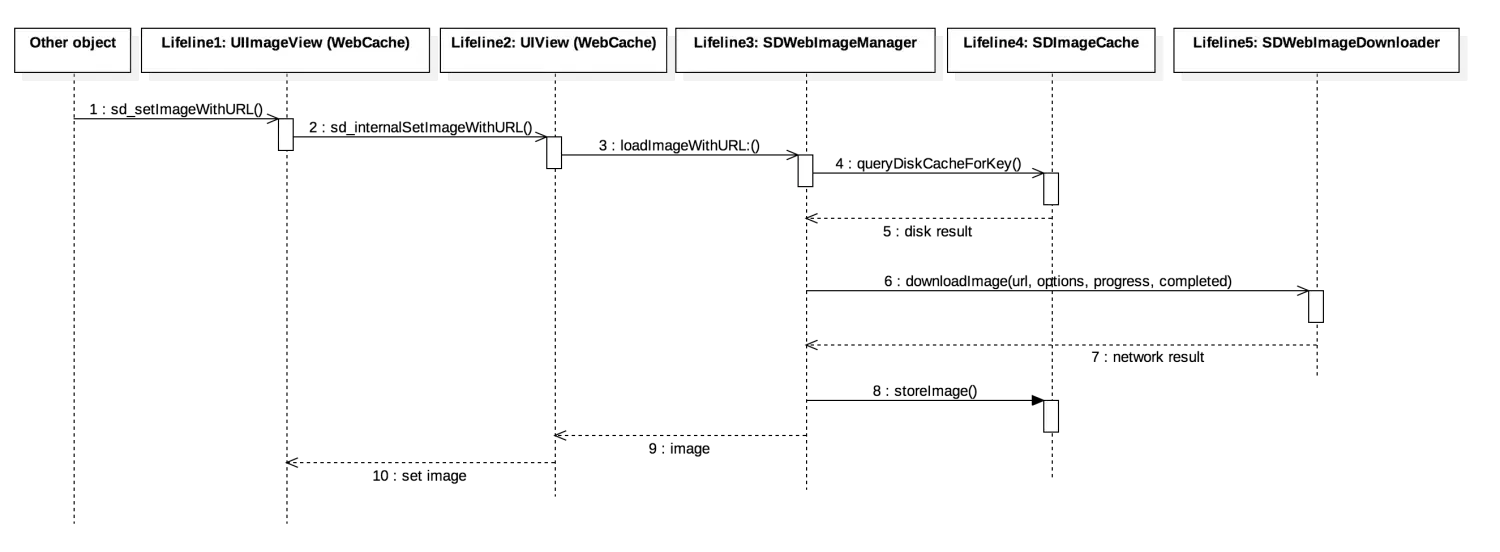
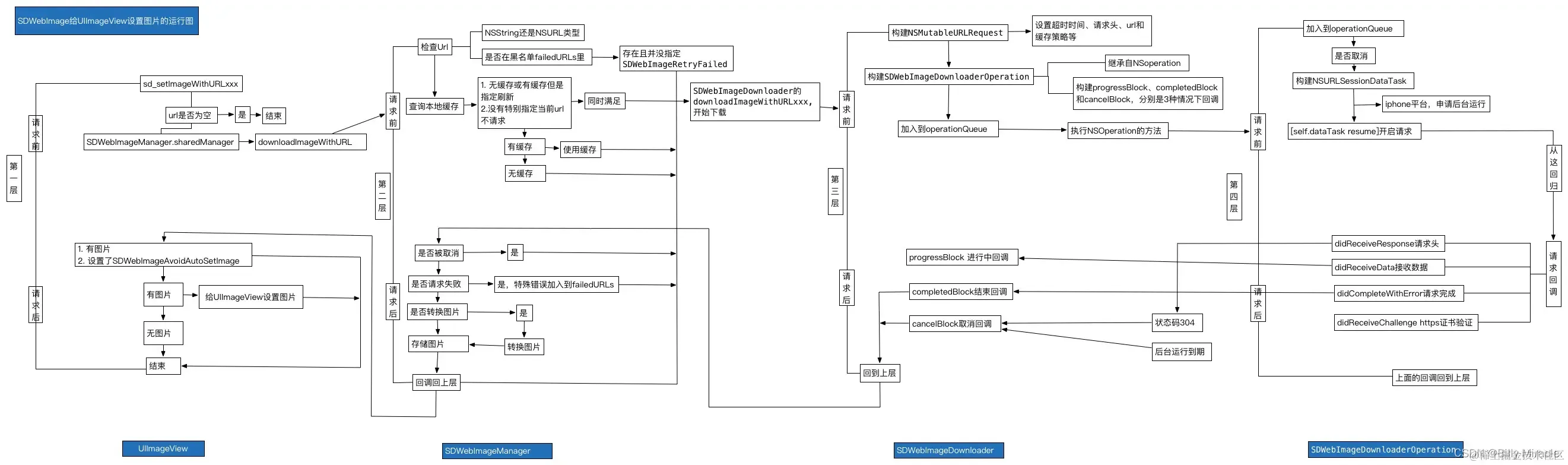
UIImageView+WebCache 与 UIButton+WebCache 最终通过 UIView+WebCache 的 sd_internalSetImageWithURL: 发起加载,并按 validOperationKey 保存 operation。SDWebImageManager 查询 imageCache,缓存未命中时调用 imageLoader;不要把旧版 delegate 回调名当作 5.x 的公开接口。
SDWebImageManager 使用 imageCache 查询内存与磁盘缓存;命中时返回缓存结果。
未命中时调用 imageLoader 下载;默认 loader 为 SDWebImageDownloader.sharedDownloader,也可以注入自定义实现。
5.x downloader 使用 NSURLSession;下载数据交由 SDImageCoder 解码并由 manager 回传结果,旧版 NSURLConnection、connection:didReceiveData: 与 SDWebImageDecoder 不应当作当前流程。
进度回调默认运行在后台队列,UI 分类的完成处理默认回主队列;callback queue 可按 context 配置。
结果按 cache 配置写入内存和 / 或磁盘;磁盘写入异步执行,默认 cache type 为 memory 与 disk。
SDImageCache 在初始化的时候会注册一些消息通知,在内存警告或退到后台的时候清理内存图片缓存,应用结束的时候清理过期图片。
SDWebImagePrefetcher可以预先下载图片,方便后续使用。
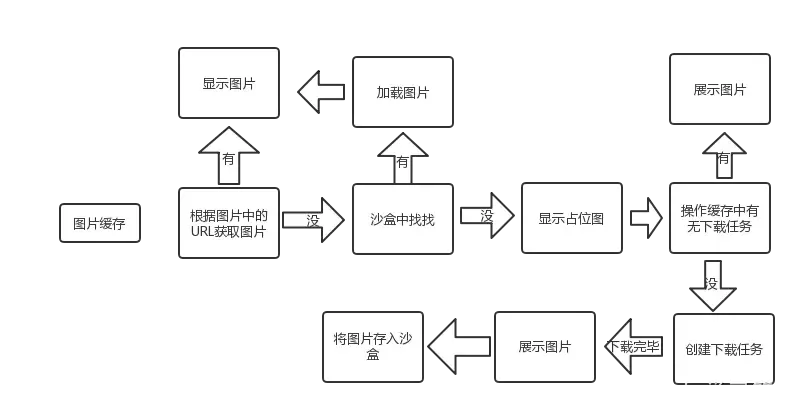
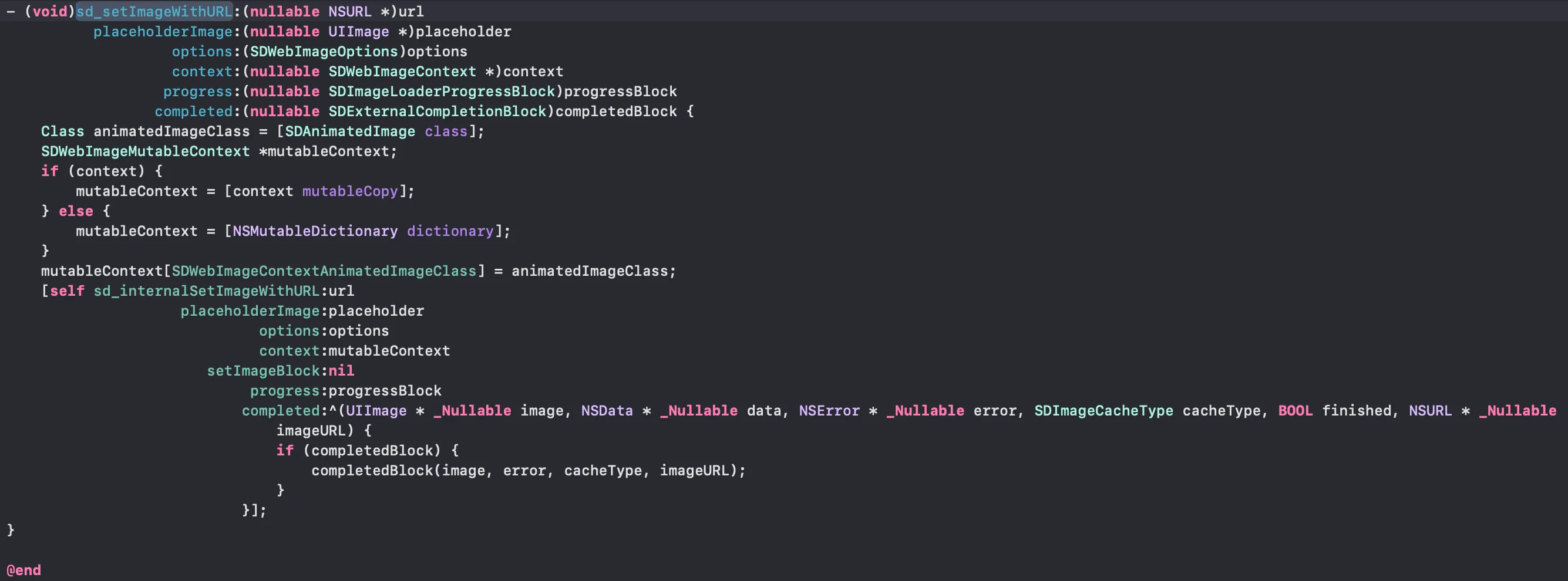
通过进一步探索,我们可以找到他的具体实现:
- (nullable id<SDWebImageOperation>)sd_internalSetImageWithURL:(nullable NSURL *)url placeholderImage:(nullable UIImage *)placeholder options:(SDWebImageOptions)options context:(nullable SDWebImageContext *)context setImageBlock:(nullable SDSetImageBlock)setImageBlock progress:(nullable SDImageLoaderProgressBlock)progressBlock completed:(nullable SDInternalCompletionBlock)completedBlock {
// Very common mistake is to send the URL using NSString object instead of NSURL. For some strange reason, Xcode won't // throw any warning for this type mismatch. Here we failsafe this error by allowing URLs to be passed as NSString. // if url is NSString and shouldUseWeakMemoryCache is true, [cacheKeyForURL:context] will crash. just for a global protect. if ([url isKindOfClass:NSString.class]) { url = [NSURL URLWithString:(NSString *)url]; } // Prevents app crashing on argument type error like sending NSNull instead of NSURL if (![url isKindOfClass:NSURL.class]) { url = nil; }
if (context) { // copy to avoid mutable object context = [context copy]; } else { context = [NSDictionary dictionary]; } NSString *validOperationKey = context[SDWebImageContextSetImageOperationKey]; if (!validOperationKey) { // pass through the operation key to downstream, which can used for tracing operation or image view class validOperationKey = NSStringFromClass([self class]); SDWebImageMutableContext *mutableContext = [context mutableCopy]; mutableContext[SDWebImageContextSetImageOperationKey] = validOperationKey; context = [mutableContext copy]; } self.sd_latestOperationKey = validOperationKey; if (!(SD_OPTIONS_CONTAINS(options, SDWebImageAvoidAutoCancelImage))) { // cancel previous loading for the same set-image operation key by default [self sd_cancelImageLoadOperationWithKey:validOperationKey]; } SDWebImageLoadState *loadState = [self sd_imageLoadStateForKey:validOperationKey]; if (!loadState) { loadState = [SDWebImageLoadState new]; } loadState.url = url; [self sd_setImageLoadState:loadState forKey:validOperationKey];
SDWebImageManager *manager = context[SDWebImageContextCustomManager]; if (!manager) { manager = [SDWebImageManager sharedManager]; } else { // remove this manager to avoid retain cycle (manger -> loader -> operation -> context -> manager) SDWebImageMutableContext *mutableContext = [context mutableCopy]; mutableContext[SDWebImageContextCustomManager] = nil; context = [mutableContext copy]; } SDCallbackQueue *queue = context[SDWebImageContextCallbackQueue]; BOOL shouldUseWeakCache = NO; if ([manager.imageCache isKindOfClass:SDImageCache.class]) { shouldUseWeakCache = ((SDImageCache *)manager.imageCache).config.shouldUseWeakMemoryCache; } if (!(options & SDWebImageDelayPlaceholder)) { if (shouldUseWeakCache) { NSString *key = [manager cacheKeyForURL:url context:context]; // call memory cache to trigger weak cache sync logic, ignore the return value and go on normal query // this unfortunately will cause twice memory cache query, but it's fast enough // in the future the weak cache feature may be re-design or removed [((SDImageCache *)manager.imageCache) imageFromMemoryCacheForKey:key]; } [(queue ?: SDCallbackQueue.mainQueue) async:^{ [self sd_setImage:placeholder imageData:nil basedOnClassOrViaCustomSetImageBlock:setImageBlock cacheType:SDImageCacheTypeNone imageURL:url]; }]; }
id <SDWebImageOperation> operation = nil;
if (url) { // reset the progress NSProgress *imageProgress = loadState.progress; if (imageProgress) { imageProgress.totalUnitCount = 0; imageProgress.completedUnitCount = 0; }
#if SD_UIKIT || SD_MAC // check and start image indicator [self sd_startImageIndicatorWithQueue:queue]; id<SDWebImageIndicator> imageIndicator = self.sd_imageIndicator;#endif
SDImageLoaderProgressBlock combinedProgressBlock = ^(NSInteger receivedSize, NSInteger expectedSize, NSURL * _Nullable targetURL) { if (imageProgress) { imageProgress.totalUnitCount = expectedSize; imageProgress.completedUnitCount = receivedSize; }#if SD_UIKIT || SD_MAC if ([imageIndicator respondsToSelector:@selector(updateIndicatorProgress:)]) { double progress = 0; if (expectedSize != 0) { progress = (double)receivedSize / expectedSize; } progress = MAX(MIN(progress, 1), 0); // 0.0 - 1.0 dispatch_async(dispatch_get_main_queue(), ^{ [imageIndicator updateIndicatorProgress:progress]; }); }#endif if (progressBlock) { progressBlock(receivedSize, expectedSize, targetURL); } }; @weakify(self); operation = [manager loadImageWithURL:url options:options context:context progress:combinedProgressBlock completed:^(UIImage *image, NSData *data, NSError *error, SDImageCacheType cacheType, BOOL finished, NSURL *imageURL) { @strongify(self); if (!self) { return; } // if the progress not been updated, mark it to complete state if (imageProgress && finished && !error && imageProgress.totalUnitCount == 0 && imageProgress.completedUnitCount == 0) { imageProgress.totalUnitCount = SDWebImageProgressUnitCountUnknown; imageProgress.completedUnitCount = SDWebImageProgressUnitCountUnknown; }
#if SD_UIKIT || SD_MAC // check and stop image indicator if (finished) { [self sd_stopImageIndicatorWithQueue:queue]; }#endif
BOOL shouldCallCompletedBlock = finished || (options & SDWebImageAvoidAutoSetImage); BOOL shouldNotSetImage = ((image && (options & SDWebImageAvoidAutoSetImage)) || (!image && !(options & SDWebImageDelayPlaceholder))); SDWebImageNoParamsBlock callCompletedBlockClosure = ^{ if (!self) { return; } if (!shouldNotSetImage) { [self sd_setNeedsLayout]; } if (completedBlock && shouldCallCompletedBlock) { completedBlock(image, data, error, cacheType, finished, url); } };
// case 1a: we got an image, but the SDWebImageAvoidAutoSetImage flag is set // OR // case 1b: we got no image and the SDWebImageDelayPlaceholder is not set if (shouldNotSetImage) { [(queue ?: SDCallbackQueue.mainQueue) async:callCompletedBlockClosure]; return; }
UIImage *targetImage = nil; NSData *targetData = nil; if (image) { // case 2a: we got an image and the SDWebImageAvoidAutoSetImage is not set targetImage = image; targetData = data; } else if (options & SDWebImageDelayPlaceholder) { // case 2b: we got no image and the SDWebImageDelayPlaceholder flag is set targetImage = placeholder; targetData = nil; }
#if SD_UIKIT || SD_MAC // check whether we should use the image transition SDWebImageTransition *transition = nil; BOOL shouldUseTransition = NO; if (options & SDWebImageForceTransition) { // Always shouldUseTransition = YES; } else if (cacheType == SDImageCacheTypeNone) { // From network shouldUseTransition = YES; } else { // From disk (and, user don't use sync query) if (cacheType == SDImageCacheTypeMemory) { shouldUseTransition = NO; } else if (cacheType == SDImageCacheTypeDisk) { if (options & SDWebImageQueryMemoryDataSync || options & SDWebImageQueryDiskDataSync) { shouldUseTransition = NO; } else { shouldUseTransition = YES; } } else { // Not valid cache type, fallback shouldUseTransition = NO; } } if (finished && shouldUseTransition) { transition = self.sd_imageTransition; }#endif [(queue ?: SDCallbackQueue.mainQueue) async:^{#if SD_UIKIT || SD_MAC [self sd_setImage:targetImage imageData:targetData options:options basedOnClassOrViaCustomSetImageBlock:setImageBlock transition:transition cacheType:cacheType imageURL:imageURL callback:callCompletedBlockClosure];#else [self sd_setImage:targetImage imageData:targetData basedOnClassOrViaCustomSetImageBlock:setImageBlock cacheType:cacheType imageURL:imageURL]; callCompletedBlockClosure();#endif }]; }]; [self sd_setImageLoadOperation:operation forKey:validOperationKey]; } else {#if SD_UIKIT || SD_MAC [self sd_stopImageIndicatorWithQueue:queue];#endif if (completedBlock) { [(queue ?: SDCallbackQueue.mainQueue) async:^{ NSError *error = [NSError errorWithDomain:SDWebImageErrorDomain code:SDWebImageErrorInvalidURL userInfo:@{NSLocalizedDescriptionKey : @"Image url is nil"}]; completedBlock(nil, nil, error, SDImageCacheTypeNone, YES, url); }]; } }
return operation;}这个方法简要流程:
- 讲
SDWebImageContext复制并转换为immutable,获取其中的validOperationkey值作为校验值 id,默认值为当前 view 的类名 - 取消与当前 view/key 关联的上一项加载操作,避免将过期结果应用到复用 view;同 URL 下载可能被其他订阅共享,取消一个 view 的 operation 不代表底层共享请求必然停止。
- 设置占位图;
- 初始化 SDWebImageManager 、SDImageLoaderProgressBlock , 重置 NSProgress、SDWebImageIndicator;
- 开启下载 loadImageWithURL: 并将返回的 SDWebImageOperation 存入 sd_operationDictionary,key 为 validOperationKey;
- 取到图片后,调用 sd_setImage: 同时为新的 image 添加 Transition 过渡动画;
- 动画结束后停止 indicator。
具体的代码可以参考上文代码块⬆️
取消正在进行的异步下载
// 生成一个有效的操作密钥 NSString *validOperationKey = context[SDWebImageContextSetImageOperationKey]; // 如果传入了参数就用传入的,否则就用当前类的类名 if (!validOperationKey) { validOperationKey = NSStringFromClass([self class]); SDWebImageMutableContext *mutableContext = [context mutableCopy]; mutableContext[SDWebImageContextSetImageOperationKey] = validOperationKey; context = [mutableContext copy]; }// 取消先前下载的任务[self sd_cancelImageLoadOperationWithKey:validOperationKey];
... // 下载图片操作
// 将生成的加载操作赋值给UIView的自定义属性[self sd_setImageLoadOperation:operation forKey:validOperationKey];- (void)sd_cancelImageLoadOperationWithKey:(nullable NSString *)key { if (key) { // Cancel in progress downloader from queue // 从队列中取消正在进行的下载程序
// 获取添加在UIView的自定义属性 SDOperationsDictionary *operationDictionary = [self sd_operationDictionary]; id<SDWebImageOperation> operation;
@synchronized (self) { operation = [operationDictionary objectForKey:key]; } if (operation) { // 实现了SDWebImageOperation的协议 if ([operation respondsToSelector:@selector(cancel)]) { [operation cancel]; } @synchronized (self) { [operationDictionary removeObjectForKey:key]; } } }}- (void)sd_setImageLoadOperation:(nullable id<SDWebImageOperation>)operation forKey:(nullable NSString *)key { if (key) { // 如果之前已经有过该图片的下载操作,则取消之前的图片下载操作 if (operation) { SDOperationsDictionary *operationDictionary = [self sd_operationDictionary]; @synchronized (self) { [operationDictionary setObject:operation forKey:key]; } } }}这里引用学长的一段话:
实际加载操作由 sd_operationDictionary 按 view/key 管理;新请求会取消该键对应的旧 operation,不会因此取消其他 view 对同一 URL 的订阅。
通俗来说:为同一 view/key 设置新请求时会取消之前的 operation,避免旧结果覆盖新内容;这不代表全局不再并发加载,也不保证共享下载对其他订阅者停止。
- 重复加载: 指的是在同一时间点或短时间内多次加载相同资源的情况。这可能是由于代码逻辑错误、用户操作或系统问题导致的。重复加载可能会造成资源浪费、性能下降和不必要的网络请求。
- 并发加载: 指的是在同一时间点或短时间内同时进行多个加载操作的情况。这种情况通常发生在多线程或并发执行的环境下,多个加载操作可以同时进行,以提高效率和响应性。但是必须确保每个加载操作独立处理自己的资源,否则会出现数据竞争和冲突。
下载图片
图片加载由 SDWebImageManager 协调;sharedManager 是默认共享实例,也可以通过 initWithCache:loader: 创建使用自定义 cache/loader 的 manager。
- (nullable SDWebImageCombinedOperation *)loadImageWithURL:(nullable NSURL *)url options:(SDWebImageOptions)options context:(nullable SDWebImageContext *)context progress:(nullable SDImageLoaderProgressBlock)progressBlock completed:(nonnull SDInternalCompletionBlock)completedBlock;SDWebImageManager 协调 imageCache 与 imageLoader 协议对象;默认 loader 可使用 SDWebImageDownloader.sharedDownloader,也可以通过初始化参数注入自定义实现。它们不是固定绑定的一对 singleton。
@interface SDWebImageManager : NSObject
@property (weak, nonatomic) id <SDWebImageManagerDelegate> delegate;
@property (strong, nonatomic, readonly, nonnull) id<SDImageCache> imageCache;@property (strong, nonatomic, readonly, nonnull) id<SDImageLoader> imageLoader;
...
@end他的几个核心 api:
// 可通过 initWithCache:loader: 创建自定义 manager;sharedManager 是默认共享实例。- (nonnull instancetype)initWithCache:(nonnull id<SDImageCache>)cache loader:(nonnull id<SDImageLoader>)loader NS_DESIGNATED_INITIALIZER;// 下载图片- (nullable SDWebImageCombinedOperation *)loadImageWithURL:(nullable NSURL *)url options:(SDWebImageOptions)options context:(nullable SDWebImageContext *)context progress:(nullable SDImageLoaderProgressBlock)progressBlock completed:(nonnull SDInternalCompletionBlock)completedBlock;- (void)cancelAll;@property (nonatomic, assign, readonly, getter=isRunning) BOOL running;- (nullable NSString *)cacheKeyForURL:(nullable NSURL *)url;下载图片的主要过程,也是这几个方法:
- (nullable SDWebImageCombinedOperation *)loadImageWithURL:(nullable NSURL *)url options:(SDWebImageOptions)options context:(nullable SDWebImageContext *)context progress:(nullable SDImageLoaderProgressBlock)progressBlock completed:(nonnull SDInternalCompletionBlock)completedBlock;### SDWebImageDownloader
具体的网络操作由`SDWebImageDownloaderOperation`对象处理,图片的下载是放在一个`NSOperationQueue`完成的
```objective-c@property (strong, nonatomic, nonnull) NSOperationQueue *downloadQueue;默认最大并发下载数为 6,配置项位于 SDWebImageDownloaderConfig.maxConcurrentDownloads;修改默认配置应在共享 downloader 首次创建前完成。
通过观察- (nullable SDWebImageDownloadToken *)downloadImageWithURL:(nullable NSURL *)url options:(SDWebImageDownloaderOptions)options context:(nullable SDWebImageContext *)context progress:(nullable SDWebImageDownloaderProgressBlock)progressBlock completed:(nullable SDWebImageDownloaderCompletedBlock)completedBlock的代码,我们可以看出来,SDWebImageDownloader把operation加到队列中执行:
// 将操作对象添加到操作队列中[self.downloadQueue addOperation:operation];这两行代码是SDWebImageDownloader开启下载任务的 关键 :
- 生成下载任务的 Operation 操作;
- 将 Operation 操作加入到队列中,实现异步任务下载;
SDWebImageOptions
参数列表中有一项SDWebImageOptions,这.h 文件中定义了一个可以暴露在外的选择方法。
typedef NS_OPTIONS(NSUInteger, SDWebImageOptions) {
// 默认情况下,当URL下载失败时,URL会被列入黑名单,导致库不会再去重试,该标记用于禁用黑名单 SDWebImageRetryFailed = 1 << 0,
// 默认情况下,图片下载开始于UI交互,该标记禁用这一特性,这样下载延迟到UIScrollView减速时 SDWebImageLowPriority = 1 << 1,
// 启用渐进式下载,下载过程中可逐步显示图片;5.x 选项名为 SDWebImageProgressiveLoad。 SDWebImageProgressiveLoad = 1 << 2,
// 即使图片缓存了,也期望HTTP响应cache control,并在需要的情况下从远程刷新图片。 // 磁盘缓存将被NSURLCache处理而不是SDWebImage,因为SDWebImage会导致轻微的性能下载。 // 该标记帮助处理在相同请求URL后面改变的图片。如果缓存图片被刷新,则完成block会使用缓存图片调用一次 // 然后再用最终图片调用一次 SDWebImageRefreshCached = 1 << 3,
// 在iOS 4+系统中,当程序进入后台后继续下载图片。这将要求系统给予额外的时间让请求完成 // 如果后台任务超时,则操作被取消 SDWebImageContinueInBackground = 1 << 4,
// 通过设置NSMutableURLRequest.HTTPShouldHandleCookies = YES;来处理存储在NSHTTPCookieStore中的cookie SDWebImageHandleCookies = 1 << 5,
// 仅用于受控测试;允许无效证书会弱化验证,生产环境不得关闭证书校验。 SDWebImageAllowInvalidSSLCertificates = 1 << 6,
// 默认情况下,图片下载按入队的顺序来执行。该标记将其移到队列的前面, // 以便图片能立即下载而不是等到当前队列被加载 SDWebImageHighPriority = 1 << 7,
// 默认情况下,占位图片在加载图片的同时被加载。该标记延迟占位图片的加载直到图片已以被加载完成 SDWebImageDelayPlaceholder = 1 << 8,
// 通常我们不调用动画图片的transformDownloadedImage代理方法,因为大多数转换代码可以管理它。 // 使用这个票房则不任何情况下都进行转换。 SDWebImageTransformAnimatedImage = 1 << 9,};5.x 中若要只写入内存缓存,可通过 context 的 SDWebImageContextStoreCacheType 指定 SDImageCacheTypeMemory;SDWebImageCacheMemoryOnly 不是该版本 SDWebImageOptions 的成员。
SDImageCache
SDWebImage.h 这个类在源代码有这样一个注释,翻译过来大概就是
它维护了一个内存缓存和一个可选的磁盘缓存
磁盘缓存写入操作是异步执行的,因此不会给 UI 增加不必要的延迟。这个类还有个私有类SDMemoryCache,它继承自自 NSCache,负责管理图像的内存缓存,其内部就是将NSCache 扩展为了SDMemoryCache 协议,并为 iOS/tvOS 平台添加了@property (nonatomic, strong, nonnull) NSMapTable *weakCache; // strong-weak cache,并为其添加了信号量锁来保证线程安全。
weakCache 可用于内存缓存清理后的恢复;shouldUseWeakMemoryCache 在 SDWebImage 5.12.0 起默认 NO(此前为 YES),需按版本理解。
- (void)storeImage:(nullable UIImage *)image imageData:(nullable NSData *)imageData forKey:(nullable NSString *)key toMemory:(BOOL)toMemory toDisk:(BOOL)toDisk completion:(nullable SDWebImageNoParamsBlock)completionBlock;该方法将图像异步缓存到指定密钥下的内存中,可以选择是否缓存到磁盘中,并且可以直接将图像的数据保存到磁盘中,就不必再通过将原图像编码后获取图像的数据再保存到磁盘中,以节省硬件资源.
刚才我们可能注意到,下载的方法中都有一个SDImageType的参数
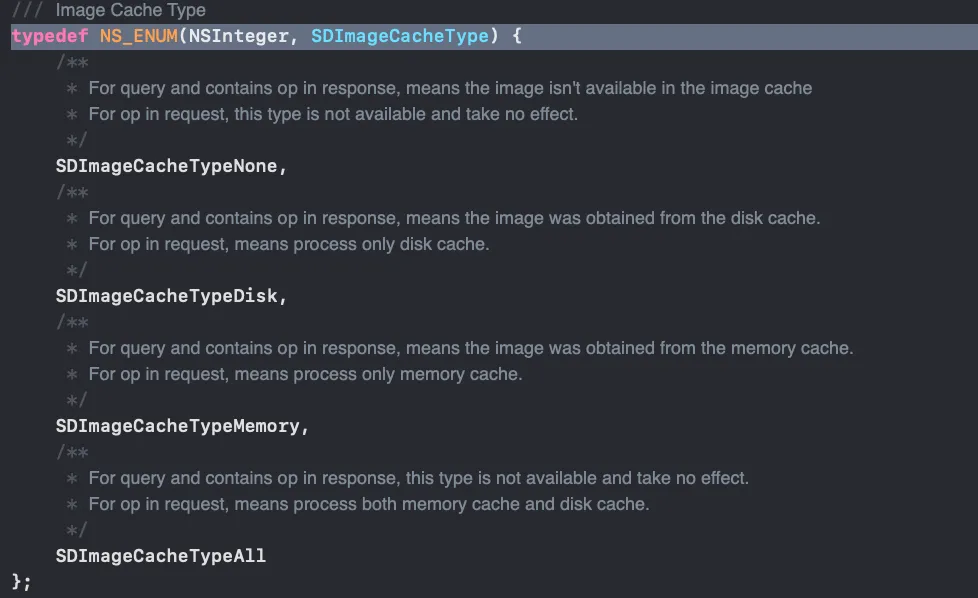
//定义Cache类型typedef NS_ENUM(NSInteger, SDImageCacheType) {//不使用cache获得图片,依然会从web下载图片 SDImageCacheTypeNone,//图片从disk获得 SDImageCacheTypeDisk,//图片从Memory中获得 SDImageCacheTypeMemory};设置最大缓存和时间设置
SDWebImage 5.21.7 使用 SDImageCacheConfig 配置缓存:maxMemoryCost 为内存 cost(bytes),maxDiskSize 为磁盘上限(bytes),maxDiskAge 为磁盘过期时间(seconds)。
可在创建共享 cache/downloader 前,通过 SDImageCacheConfig 与 SDWebImageDownloaderConfig 的 default config 设置缓存限制和下载并发数。
// 在共享 cache / downloader 首次创建前配置默认值SDImageCacheConfig *cacheConfig = [SDImageCacheConfig defaultCacheConfig];cacheConfig.maxMemoryCost = 1000000; // bytescacheConfig.maxDiskSize = 640000; // bytescacheConfig.maxDiskAge = 7 * 24 * 60 * 60; // seconds
SDWebImageDownloaderConfig *downloaderConfig = [SDWebImageDownloaderConfig defaultDownloaderConfig];downloaderConfig.maxConcurrentDownloads = 1; // 默认值为 6
SDWebImageManager *manager = [SDWebImageManager sharedManager];[manager loadImageWithURL:[NSURL URLWithString:@"http://p9.qhimg.com/t01eb74a44c2eb43193.jpg"] options:SDWebImageProgressiveLoad context:nil progress:^(NSInteger receivedSize, NSInteger expectedSize, NSURL * _Nullable targetURL) { NSLog(@"%ld", (long)receivedSize); } completed:^(UIImage * _Nullable image, NSData * _Nullable data, NSError * _Nullable error, SDImageCacheType cacheType, BOOL finished, NSURL * _Nullable imageURL) { if (image) self.imageView1.image = image; }];
[manager loadImageWithURL:[NSURL URLWithString:@"http://img.article.pchome.net/00/28/33/87/pic_lib/wm/kuanpin12.jpg"] options:SDWebImageProgressiveLoad context:nil progress:nil completed:^(UIImage * _Nullable image, NSData * _Nullable data, NSError * _Nullable error, SDImageCacheType cacheType, BOOL finished, NSURL * _Nullable imageURL) { if (image) self.imageView2.image = image; }];
SDImageCache *imageCache = [SDImageCache sharedImageCache];NSUInteger size = [imageCache totalDiskSize];NSUInteger count = [imageCache totalDiskCount];NSLog(@"size = %lu, count = %lu", (unsigned long)size, (unsigned long)count);[imageCache clearDiskOnCompletion:^{ NSLog(@"disk cache cleared"); }];三种缓存(内存图片缓存、磁盘图片缓存、内存操作缓存)
- 先查看内存图片缓存,内存图片缓存没有,后生成操作,查看磁盘图片缓存
- 磁盘图片缓存有,就加载到内存缓存,没有就下载图片
- 在建立下载操作之前,判断下载操作是否存在
- 默认情况下,下载的图片数据会同时缓存到内存和磁盘中
1、内存缓存及磁盘缓存
- 内存缓存的处理由 NSCache 对象实现,NSCache 类似一个集合的容器,它存储 key-value 对,类似于 nsdictionary 类,我们通常使用缓存来临时存储短时间使用但创建昂贵的对象,重用这些对象可以优化新能,同时这些对象对于程序来说不是紧要的,如果内存紧张就会自动释放。
- 磁盘缓存的处理使用 NSFileManager 对象实现,图片存储的位置位于 cache 文件夹,另外 SDImageCache 还定义了一个串行队列来异步存储图片。
- SDImageCache 提供了大量方法来缓存、获取、移除及清空图片。对于图片的索引,我们通过一个 key 来索引,在内存中,我们将其作为 NSCache 的 key 值,而在磁盘中,我们用这个 key 值作为图片的文件名,对于一个远程下载的图片其 url 实作为这个 key 的最佳选择。
2、存储图片
先在内存中放置一份缓存,如果需要缓存到磁盘,将磁盘缓存操作作为一个 task 放到串行队列中处理,会先检查图片格式是 jpeg 还是 png,将其转换为响应的图片数据,最后吧数据写入磁盘中(文件名是对 key 值做 MD5 后的串)
3、查询图片
内存和磁盘查询图片 API:
- (UIImage *)imageFromMemoryCacheForKey:(NSString *)key;- (UIImage *)imageFromDiskCacheForKey:(NSString *)key;查看本地是否存在指定 key 的图片:
- (nullable SDImageCacheToken *)queryCacheOperationForKey:(nullable NSString *)key done:(nullable SDImageCacheQueryCompletionBlock)doneBlock;还有一些其他的常见接口和属性:
totalDiskSize/totalDiskCount:磁盘缓存占用字节数 / 图片数量。clearMemory:清理内存缓存;removeImageForKey:withCompletion:可移除指定图片。maxMemoryCost:内存 cost 上限,单位为 bytes,不是像素总和。maxDiskSize:磁盘缓存上限,单位为 bytes;默认0表示不限制。maxDiskAge:磁盘缓存过期时长,单位为秒,默认一周。
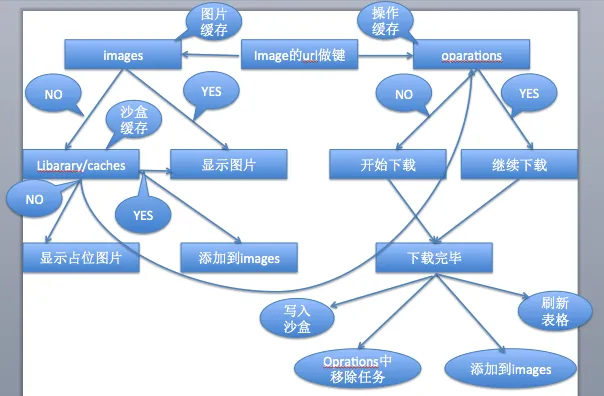
- SDWebImage 的大部分工作是由缓存对象 SDImageCache 和异步下载器管理对象 SDWebImageManager 来完成的。
- SDWebImage 5.x 的
SDWebImageDownloader使用 NSURLSession;NSURLConnection下载流程属于旧版实现,不应描述为当前下载器的依赖。
三、小结
SDWebImage通过了一系列复杂的封装,把一个繁琐的过程封装成简单的接口来使用,实现了并发的图片下载及解压缩操作以及内存与磁盘存储等复杂功能
原文发布于 CSDN:【iOS】SDWebImage 解析